Welcome to Drivelaar!

Keeping your drive hassle free with our App.

For the very first time in New York City, Laaref Technology—a USA-based IT innovator—proudly unveils a powerful new solution built exclusively for respected TLC drivers and owners.
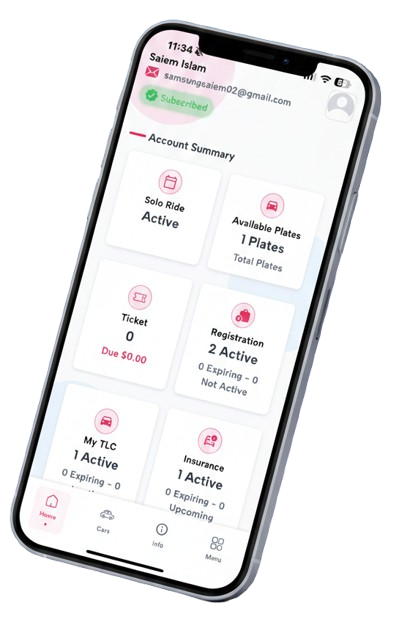

Drivelaar App Screenshot

Check Your Plate For Free

TLC Info Instant
NYC Violations 12 Months
DMV Registration Included
Your Plate Report
Enter a plate number

results will appear here

App Features

Manage and receive notifications for single or multiple vehicles in one app and its website. Designed for individual owners and corporate fleets, including TLC car rental and yellow taxi companies, to easily monitor their vehicles.

You can use this app any country from world and you will be notified real-time.
Drivelaar — Smart assistance for managing your single and multiple TLC vehicles in one app.

NYC Ticket Monitoring

New York City red light tickets, parking tickets, and any other tickets issued by the police will be instantly alerted to your mobile phone. You won't have to look anywhere else. You won't have to worry about your tickets anymore.

NYC TLC Details Tracking

Our drivelaar app will regularly inform you about TLC plate information and TLC plate active, inactive and before expiration. So that you don't have to worry about TLC updates for your plate anymore.

NYC DMV Registration

Our Driveraar app will notify you regularly before your DMV registration expires. It will protect you from any fines due to not renewing on time. You will be able to know about the suspension of your registration, so you don't have to worry anymore.

Car Insurance Management

Your TLC Insurance monthly premium bill will be regularly reminded to be paid, so that you do not have to face penalties for not paying the bill on time. You will not have to worry about surrendering your plates due to not renewing your insurance on time, even before your insurance expires.

How The System Works

Simple steps to keep your Drive hassle-free

1

Enter Your Plate Number

Enter your vehicle's license plate number to begin monitoring your TLC details.

2

Monitoring

Our system will monitor your TLC details and alert you of any changes or updates.

3

Alerts

You will be notified of any important updates or changes to your TLC details.

4

Stay Updated

Keep your TLC details up to date and avoid any penalties or fines.

Download and Use

1

Download the app

Go to Apple App Store or Google Play Store and search "Drivelaar" to install on your phone

2

Create your account

Submit your basic information to create your personal account

3

Choose subscription plan

Select a plan based on the number of license plates you need to monitor

4

Enter your plate number

Go to "My Plates" page and add your vehicle license plates

5

Add insurance details

Add your insurance information with due dates for automatic reminders

That's it! We'll take care of the rest of your notifications and alerts.

Our Packages

Choose the best plan for your needs

Free For You

1 License Plate
$0.00/month
  • Ticket Monitoring
  • Insurance Expiry Alerts
  • License Plate Updates
  • Automatic Renewal Reminders
Get Started

Custom Packages

Unlimited License Plates
  • Ticket Monitoring
  • Insurance Expiry Alerts
  • License Plate Updates
  • Automatic Renewal Reminders
  • Custom Support
Contact Us

Secure Payment System

Your transactions are protected with bank-level security and encrypted with Stripe, the global leader in online payment processing.

Our Secure & Encrypted Payment

We use Stripe to ensure your payment information is handled with the highest security standards.

Why Choose Our Secure Payment?

Your card details are never stored on our servers and are encrypted end-to-end using industry-leading security protocols.

Apple Pay & Google Pay

Securely pay with your Apple or Google account using biometric authentication. Enjoy faster, more secure checkout without sharing your card details.

End-to-End Encryption

All payment data is encrypted using AES-256 encryption, both in transit and at rest. Your information remains private and secure throughout the entire transaction process.

Instant Processing

Payments are processed instantly with 99.9% uptime guarantee and real-time fraud detection powered by Stripe's advanced algorithms.

•••• •••• •••• 4242

CARDHOLDER NAME

Your Name on Card

EXPIRES

08/28

Apple Pay
Google Pay
Secured by Stripe
Fraud Protection
256-bit SSL
Global Payments
3D Secure

Frequently Asked Questions

Find answers to common questions about Drivelaar

How does Drivelaar access my vehicle information?

Drivelaar accesses vehicle information through secure APIs provided by vehicle registration databases. We ensure all data is encrypted and handled in compliance with privacy regulations.

How do I add a vehicle to my account?

To add a vehicle to your account, navigate to the "My Vehicles" section in your Drivelaar dashboard and click "Add Vehicle". You will be prompted to enter the license plate number and vehicle details.

How do I update my vehicle information?

You can update your vehicle information by going to the "My Vehicles" section in your Drivelaar dashboard and selecting the vehicle you want to update. From there, you can edit the details as needed.

How do I cancel my subscription?

To cancel your subscription, go to the "My Account" section in your Drivelaar dashboard and select "Cancel Subscription". You will be prompted to confirm the cancellation.

How do I reset my password?

To reset your password, go to the "My Account" section in your Drivelaar dashboard and select "Reset Password". You will be prompted to enter your email address and follow the instructions sent to you.

Contact Us

Have questions? Get in touch with our team

We'd love to hear from you

Whether you have questions about our services, need support, or want to provide feedback, our team is ready to help.

126 Walnut St Lynbrook, NY 11563
+1 (201) 800-0111 +1 (917) 310-2870
write@Drivelaar.com